


Inoreader: News & RSS reader
2.9921.00 Reviews
App Specs
- Version
- 7.9.11
- Updated On
- License
- Free
- Downloads
- 500,000+
- Developer
- Innologica
- Categories
- News & Magazines
- Platform
- Android, iOS
Screenshots


 Analysis by AppCompare
When I’m trying to follow several topics at once, a traditional news app can leave me dependent on its own selection of stories, while a long list of separate websites becomes tedious to check. An RSS reader takes a different approach: I choose sources and bring their updates into one place. That makes Inoreader: News & RSS Reader most appealing to readers who want to shape their own news routine rather than rely entirely on a general-purpose feed.
A feed you build around your own routine
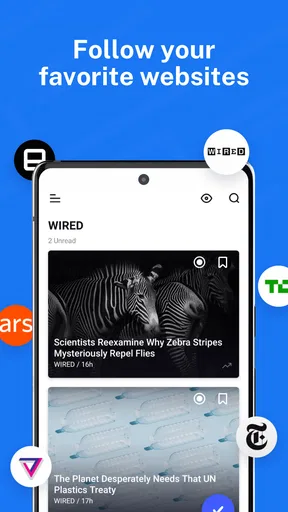
I’d use Inoreader for a mix of sources that are easy to lose track of otherwise: a few news publishers, specialist blogs, and sites covering a hobby or professional subject. Instead of opening each one in a browser, I can make a reading list that reflects what I actually care about. The useful shift is not simply having more articles in one screen; it is choosing which sources deserve space in my day.
That choice also asks something of the reader. If you already know the publications and sites you want to follow, a reader can make them easier to manage. If you want an app to decide what is important and present a finished selection with almost no setup, a curated news service may be a better fit. Inoreader’s appeal is strongest when control matters more to you than having the app make all the editorial choices.
Where it fits among news apps
Compared with a publisher’s own app, an RSS reader is less tied to one newsroom and can bring unrelated sources together. Compared with scrolling a social feed, it gives you a more deliberate way to follow chosen sites rather than relying on whatever happens to appear in a stream. Those differences are valuable, but they also mean the experience depends on your source selection: a well-chosen collection feels focused, while a pile of loosely related feeds can recreate the very overload you hoped to escape.
For everyday news, I would keep a small group of dependable sources together and put niche reading in separate folders or tags if that organization suits my habits. That simple separation helps me check essential updates without having to work through every interesting article at the same time. It also makes the app more useful on a busy day: I can skim what matters now and leave deeper reading for later.
Inoreader is a free app in the News & Magazines category, developed by Innologica. It is rated for Everyone, and its long-running presence in the category is reflected in its release on August 9, 2013. The current version is 7.9.8, with Android 6.0 as the minimum operating-system requirement. Its average rating is 2.9 from around 9,500 ratings, so I would treat it as a tool to try for yourself rather than assuming it will suit everyone. Optional in-app purchases range from $8.99 to $89.99 per item.
Those details matter in practical ways. The free entry point makes it possible to judge whether an RSS-based routine works for you before deciding whether any paid option is worthwhile. The rating also encourages realistic expectations: readers who enjoy configuring their information flow may find a lot to like, while someone expecting a polished, fully guided news experience may be less patient with the setup and choices involved.
Worth Reading Before You Choose

EA SPORTS FC Mobile 26 Is a Bigger Football Game, but It Takes Time

Flipboard Shows What News Apps Must Do Beyond the Feed

Switching to Android Auto Means Rethinking Your Driving Routine

Google Calendar Makes a Crowded Week Easier to Manage

Ludo King Makes the Most of the Minutes Between Plans

Baby Panda World Brings Quick Play to Modern Phones, but Its Game Library Feels Busy
Building a reading habit that holds up on busy days
I’d build a reading habit around a small, dependable set of sources and let it grow only when I can see a real gap. That keeps a quick check from turning into an obligation to clear an ever-expanding queue. The next question is how to keep that routine useful when a busy day leaves little time to read.
Getting started without creating a bigger backlog
From the moment you download Inoreader, the setup is a breeze. Whether you’re on Android or iOS, the app welcomes you with a clean and intuitive interface. The onboarding process guides you through adding your first feeds, and before you know it, you’re knee-deep in content tailored just for you. It’s almost like the app knows what you’re into even before you do.
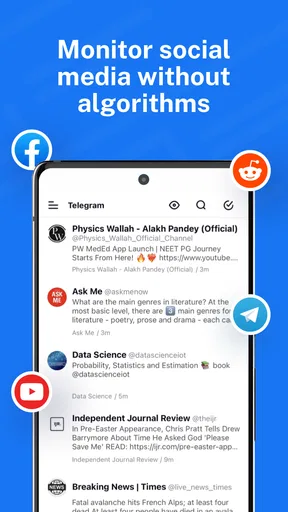
The beauty of Inoreader lies in its simplicity. It doesn't bombard you with unnecessary bells and whistles. Instead, it focuses on what matters: delivering content that you care about. The app supports a wide range of feed formats, including RSS, Atom, and even social media feeds. It’s your one-stop-shop for all things digital, allowing you to declutter your online reading experience.
One thing I’d do differently from an enthusiastic first-day setup is add sources gradually. A long list can look satisfying, but every source contributes to the amount of new material competing for attention. I’d begin with the publications I genuinely check, then add a specialist blog only when I know I want its updates in my routine. That small bit of restraint makes the feed more useful than subscribing to everything that looks interesting in the moment.
Features That Stand Out
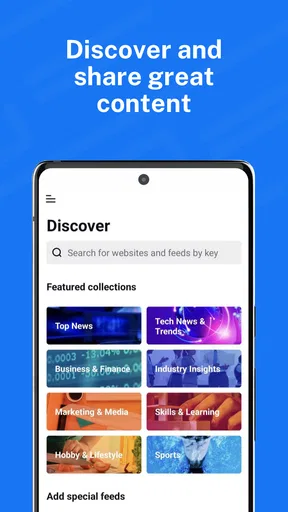
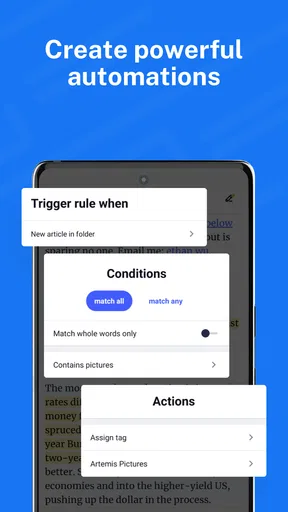
One feature I absolutely love is the content discovery engine. It’s like having a personal curator that suggests feeds based on your interests. Whether you’re into tech, fashion, or world news, Inoreader has got you covered. And if you’re particularly picky, you can create rules and filters to customize what you see. It’s a bit like having a superpower, honestly.
Rules and filters are most helpful when they solve a recurring problem, not when they become a project of their own. For example, if a broad topic regularly fills your reading list with material you rarely open, a filter can help you narrow what catches your attention. I’d first observe what repeatedly clutters the feed, then make one targeted adjustment and see whether it improves the next few days of reading. Building lots of rules before understanding your habits risks making the system harder to manage than the articles themselves.
Let’s talk about the offline mode for a second. Ever been stuck somewhere without internet and wished you could catch up on your reading? Inoreader’s got you. With offline reading, you can save articles and access them anytime, anywhere. It’s a lifesaver for those long commutes or when you’re in a Wi-Fi black hole.
A realistic use for that option is preparing a short reading queue before leaving home, then using a commute or waiting-room stretch to read without depending on a steady connection. I’d treat saved articles as a deliberate shortlist rather than an archive of everything that looks promising. Otherwise, offline access can make it easy to carry a backlog around without actually reducing it. If you mainly read while connected and rarely save pieces for later, this advantage may not affect your choice much.
Customization Galore
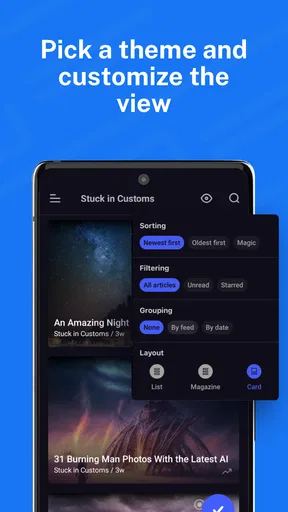
Inoreader isn’t just about consuming content; it’s about consuming it your way. You can tweak the reading interface to match your style—whether it’s a list view, magazine layout, or card view. Plus, with night mode, your late-night reading won’t strain your eyes. It’s these little touches that make a big difference.
I’d choose a view based on the kind of reading I’m doing rather than trying to find one perfect layout. A compact list can make scanning many headlines feel more manageable, while a more visual presentation may be pleasant when I have time to browse. Changing the display is useful, but it cannot make a large or poorly chosen set of sources less demanding. The best customization is the one that supports a repeatable habit, not another setting to keep adjusting.
For those who like sharing, Inoreader integrates seamlessly with social media platforms. You can easily share articles with friends or bookmark them for later. And if you’re a bit of an organizational freak like me, the tag and folder system is a dream. You’ll never lose track of an article again.
Folders and tags can do more than keep a collection tidy: they can reflect how you plan to use it. I might separate work-related sources from personal reading, or group a handful of sites around a project that I only follow for a limited period. That makes it easier to enter the app with a purpose instead of treating every article as equally urgent. I would keep the structure modest, though; too many categories turn sorting into a chore.
One everyday routine could be a quick check of a work-related folder in the morning, followed later by a slower browse through personal interests. If an article deserves more attention, I can bookmark or organize it rather than stopping every time a headline catches my eye. This is a practical trade-off: Inoreader can help separate discovery from focused reading, but only if I’m willing to decide what belongs in each part of my routine.
Performance and User Experience
Let’s get technical for a moment. In terms of performance, Inoreader is a powerhouse. I haven’t experienced any lag, even with a hefty load of feeds. The app syncs smoothly across devices, ensuring you’re always up-to-date. It’s reliable, efficient, and just plain works.
For speed, I’d distinguish between opening and navigating the app and the amount of new material a reader chooses to follow. A carefully sized collection is easier to scan than an enormous stream, and no interface can make every article worth reading. I would start with a manageable set, notice how quickly I can find what matters, and expand only if I still feel I’m missing sources. That approach is more useful than judging a reader by how much content it can accumulate.
Heavy use is where a personal feed can become demanding. If I check several subjects throughout the day, the challenge may be deciding what to skip rather than simply opening another article. A short scan followed by a saved-reading session gives me a more realistic way to keep up than trying to clear every update as it arrives. Readers who feel compelled to reach an empty inbox may find an RSS routine stressful unless they set limits on what they follow.
The user experience is stellar. Navigation is intuitive, and everything is where you expect it to be. The developers have clearly put a lot of thought into making the app user-friendly, and it shows. It’s rare to find an app that combines functionality with ease of use so seamlessly.
Reliability also depends on the reading habit around the app. I’d avoid making an RSS reader my only route to an important, time-sensitive announcement; checking a source directly can be sensible when missing an update would matter. For ordinary catch-up reading, collecting sources in one place is convenient, while saved articles offer a way to plan around periods without a connection. If a sync or connection issue interrupts a session, I would first check the connection and revisit the feed once it is stable rather than assuming every source has stopped publishing.
Device fit and sensible expectations
The Android requirement of version 6.0 means owners of older devices should check compatibility before planning their reading setup. On a supported phone, the more important practical question is how you prefer to read: a phone is convenient for brief checks and saved articles, while a larger screen can be more comfortable for reviewing a broad set of sources. I would not subscribe to far more feeds simply because the app makes adding them easy; device comfort and attention are still finite.
As for resources, I would judge the app by how it behaves on my own device rather than assume a universal battery or data impact. A long reading session and frequent refreshing are different habits from a brief daily check, and a large feed collection can mean more content to review. If performance feels uncomfortable, reducing the number of sources you follow and keeping sessions focused are sensible first steps before changing your whole news routine.
Who should skip it? If you want a ready-made front page, rarely follow specific publications, or dislike organizing information, a conventional news app may feel easier. Inoreader is more compelling for people who can name the sources they want, follow several subjects, and value having a say in what enters their reading queue. It rewards a little curation; it is not a shortcut to having no decisions to make.
Final Thoughts: Is Inoreader Worth It?
So, after spending some quality time with Inoreader, would I recommend it? Absolutely. Whether you’re a casual reader or a power user, Inoreader adapts to your needs. It’s like having a Swiss Army knife for content consumption—versatile, reliable, and always handy.
If you’re tired of the chaos in your digital life and want to streamline your reading experience, give Inoreader a shot. It’s more than just an app; it’s a game-changer. And hey, you might just find yourself enjoying the world of RSS feeds more than you ever thought possible.
My practical verdict is that Inoreader works best when I treat it as a personal reading system, not an endless stream I have to clear. I’d start with a few trusted sources, organize only where it saves time, and use saved reading for material that deserves a quieter moment. With that approach, the app’s flexibility is a genuine strength; without it, the freedom to add and sort content can become its own source of clutter.
Pros
- Highly customizable interface.
- Supports multiple RSS feeds.
- Efficient offline reading mode.
- Seamless integration with social media.
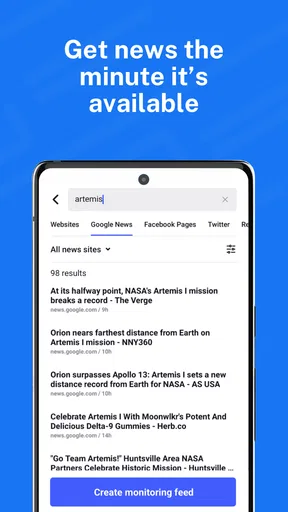
- Advanced search and filter options.
Cons
- Limited features in free version.
- Occasional sync delays.
- Requires account setup.
- Ads in free version.
- Steep learning curve for new users.
FAQs for Inoreader: News & RSS reader
What platforms is Inoreader available on?
Inoreader is available on both Android and iOS platforms, making it accessible to a wide range of users. It also offers a web version, allowing you to sync your feeds across multiple devices seamlessly. This cross-platform compatibility ensures you can stay updated on your favorite news and RSS feeds wherever you are.
Does Inoreader support offline reading?
Yes, Inoreader supports offline reading, which allows users to access their articles and feeds without an internet connection. This feature is particularly useful for those who are often on the go and may not always have reliable internet access. Simply preload your content, and you can read it anytime, anywhere.
Is there a limit to the number of feeds I can follow in Inoreader?
Inoreader offers different subscription tiers, each with varying limits on the number of feeds you can follow. The free version has a cap, but upgrading to a paid plan allows you to follow more feeds and unlocks additional features. This scalability makes Inoreader suitable for both casual readers and heavy users.
What customization options does Inoreader offer?
Inoreader provides a wide array of customization options, allowing users to tailor their reading experience. You can organize feeds into folders, tag articles, and even adjust the layout and themes to suit your preferences. This flexibility ensures that Inoreader can be adapted to fit individual reading habits and aesthetics.
How does Inoreader handle notifications and alerts?
Inoreader offers customizable notifications and alerts to keep you informed about new articles and updates from your favorite feeds. You can set specific criteria for notifications, ensuring that you only receive alerts for content that truly matters to you. This feature helps manage information overload and keeps you focused on what’s important.


